Payroll automation: How to efficiently streamline payroll processes

.jpg)
HR leaders are wearing more hats than ever, with 71% needing more people-centric skills and 74% needing more technical skills than last year.* That means they’ve got an increasingly diverse array of tasks on their to-do lists. People professionals might take on work related to recruitment, marketing, public relations, analytics, and — notably — payroll.
Effective payroll processes are essential for thriving businesses, yet they’re often time-consuming and complex. That’s especially true for HR teams juggling multiple responsibilities.
Payroll automation is one handy way to overcome that obstacle. The right software tools can speed up many parts of your organization’s payroll process, help you stay compliant, and assist you in building a seamless, scalable payroll system over time.
This article covers what payroll automation is, its top benefits, how to implement it, and how to choose the best software for your needs.
*Leapsome’s Workforce Trends Report, 2024
📣 Leapsome’s HRIS has arrived!
Our new HRIS tool has payroll automation capabilities that can improve and streamline the way your organization pays employees.
👉 Discover it now
What is payroll automation?
Payroll automation does what it says on the tin: it uses technology to automate core payroll tasks that people would otherwise have to complete manually.
From calculating wages and coordinating direct deposits to ensuring compliance with relevant labor and data privacy laws, payroll automation software is designed to make the processes involved in paying employees quicker, safer, and more accurate.
And payroll automation isn’t just for large organizations. This kind of tool is especially valuable for small to medium-sized businesses (SMBs) that don’t have large in-house teams to deal with payroll preparation and delivery. These smaller companies often have limited HR resources, meaning that tasks like data entry, time-tracking, and payslip distribution may fall on a few individuals who can quickly become overwhelmed. With that in mind, it’s no wonder that many HR professionals find the payroll period stressful.
HR software takes off some of that pressure. In fact, Business.com found that 69% of HR software users reported that their tools reduce payroll processing time. But payroll runs on multiple points of information, like compensation and tax details, time and attendance, and benefits. So, your time savings (and other benefits) depend on the quality of your data. If the details you provide live across disconnected systems, or your team doesn’t consistently update the database, the automations can produce errors or create extra review work before each payroll cycle.
A reliable HR data foundation, like a centralized HR system, gives your team one source of truth for all employee-related information. When your payroll automation process is fueled by current, clean data, payroll inputs stay accurate and easier to verify. Your HR and payroll teams will spend less time on manual corrections for better compliance, and will have the power to build a system that scales smoothly as the organization grows.
“Once it’s set up, everything runs automatically in the background. It might take hours to build, but then it just works smoothly and efficiently every time.”
— Suraj Paneru, Customer Success Coach, Leapsome
Core features of payroll automation systems
Deloitte’s research found that HR staff spend 57% of their time on administrative tasks, so automation should relieve HR teams from drowning in paperwork — in theory. However, faster payroll only helps if it also reduces the back-and-forth and late updates that make payroll stressful in the first place.
When you’re researching payroll software, prioritize features that will actually make approvals smoother and access and data management easier for employees. Here are a few of the most important tools to look out for:
- Automated payroll calculations and deductions: Payroll automation systems can calculate wages and deductions, as well as benefits contributions and taxes, based on predefined rules. That reduces your team’s manual calculation work, but the system still depends on accurate inputs. If employee and employment data is wrong, automation will push the same mistake into the payroll cycle. Make sure you have strong processes in place to guarantee proper employee data.
- Direct deposit and payment processing: Automated payroll systems can help you distribute pay through direct deposit and wire transfers, among other approved electronic payment methods. This gives employees a more predictable pay cadence and reduces how much coordination is necessary between HR, finance, and payroll processors.
- Compliance management and payroll tax updates: ElectroIQ’s 2025 Payroll Statistics Report found that 53% of surveyed companies incurred payroll penalties in the previous five years for non-compliance, totalling $2.8 billion in IRS fees. Strong payroll automation software can apply custom configured rules and update calculations when new local or federal tax rules roll out to keep teams compliant.
- Payroll reporting and audit trails: HR and payroll teams need the ability to see every change, who approved it, and when it moved into the payroll cycle. Reporting and audit trails help you investigate discrepancies and prepare for compliance checks and audits without scrambling to piece disconnected data together.
- Integration with HR and accounting systems: Duplicated entries create extra work and give errors more places to hide. If compensation or absence data changes in your HRIS, payroll needs a reliable way to work from that same information. Otherwise, the software will only automate the final payroll step while relying on your team’s manual efforts for the data that affects pay and compliance records. That’s why the HR layer of payroll automation matters — and why so many teams use Leapsome to strengthen payroll preparation by connecting employee records and compensation data before payroll inputs move into processing.
“Leapsome connects directly with DATEV for payroll. Salaries, taxes, and benefits flow to authorities automatically, and errors are flagged before submission.”
— Suraj Paneru, Customer Success Coach, Leapsome
How to implement payroll automation within your organization
Now that you know the basics of how payroll automation works and the value it can bring to your business, you may be eager to give it a try.
Below, we’ve broken down five essential steps you should take to adopt payroll automation within your company.

1. Audit your current payroll process
Before introducing new software, assess your existing systems and investigate how your business currently manages payroll. Doing so will help you understand your needs and wants, identify inefficiencies, and think about areas for improvement, while allowing you to ensure that all your internal data is up-to-date and accurate before migrating it to a new platform.
This step is vital as even seemingly minor errors can lead to larger problems and compliance issues down the line. Suppose your organization misclassified a full-time employee as a freelancer or independent contractor. In that case, you’d likely make incorrect tax deductions and maybe even find yourself in a complicated legal situation, depending on the country.
2. Choose a software provider
Next, select a payroll tool to help you address the issues you identified in the previous step. There are several kinds of payroll software to choose from, so consider your options and identify which will best suit your business:
- HRIS platforms — Some human resources information systems (HRIS) come with built-in payroll features alongside core HR capabilities. For example, the payroll tool within Leapsome HRIS launches payroll cycles based on predetermined settings and automatically pulls data from across the platform into the payroll process. This feature allows users to export Excel files in custom formats so they can send them to their accountants or integrate them with DATEV.
- Third-party providers — A third-party payroll provider will take care of most aspects of your payroll process. You’ll still need to do the groundwork each pay period when updating payroll data and employee information, but they’ll typically carry out tasks like calculating and withholding deductions, paying employees, and filing applicable taxes. Third-party payroll providers will often limit services to exactly what’s detailed in your initial service agreement, which can be tricky if unexpected payroll needs arise.
- Full-service tools — These all-in-one payroll systems are more costly options that take care of all the elements of the payroll process in a single platform. These software solutions support the full spectrum of payroll management and offer comprehensive support that can be useful for organizations with complex requirements like managing payroll across several different countries.
💡 Considering an HRIS that prioritizes core HR functions like payroll and the employee experience? We’ve got a free HRIS requirements checklist to guide your selection.
3. Prepare for data migration
Moving to an automated payroll system is a great idea, but transferring employee data can be challenging — and proper preparation is crucial for avoiding errors.
To ensure a successful and secure data migration process:
- Review and update payroll data, removing outdated information.
- Map and cleanse data, in line with data quality best practices, to ensure consistency.
- Test the migration process to ensure everything works before switching to your new payroll solution.
💡 Be sure to train your HR team to use the payroll software securely and effectively to avoid errors and improve adoption rates.
4. Transfer data to your new platform
Once you’ve audited, categorized, and cleansed your payroll data, you can transfer it to your new payroll automation platform.
It’s essential to make sure you’ve mapped your data correctly to fit seamlessly into your new payroll system. If you don’t, the system won’t work as it should, and it won’t make your payroll process as streamlined and efficient as it should be with the power of automation.
After you’ve finished the transfer, cross-check your imported payroll records against your original data to confirm that all information is accurate.
5. Test the process before running payroll
As the saying goes, failure to prepare is preparation to fail! Performing a thorough test of your new automated payroll system on a small data set will flag any process snags or inaccuracies that could lead to issues following the rollout.
This step might involve ensuring that the payslips your software solution prepares are accurate and contain all the necessary information. It might also include checking that the tool has correctly pulled data across the platform and integrated it into your payroll process.
In addition, ask people on your team to test different scenarios to get an accurate view of the software’s performance and ensure the experience is intuitive and user-friendly. Continue to run these tests over time (or double-check that your provider is taking on this responsibility) to ensure you get the most out of your tool.
🚀 Centralize and streamline your HR processes
Discover how Leapsome can help you tackle payroll and speed up other essential admin tasks in one user-friendly platform.
👉 Take a product tour
Questions to ask when choosing payroll automation software
It may come as a surprise, but many organizations still rely on spreadsheets and even paper-based methods for payroll management. As such, many businesses are yet to embrace automation to offer their teams a much-needed solution to their payroll frustrations.
If you’re keen to integrate payroll automation into your organization’s operations, ask yourself these questions to make sure you make the best possible decision for your needs:
- Can the platform scale alongside my business?
Growing companies need a flexible payroll automation system that can accommodate staffing, process, and legislation changes — no matter how many employees or locations need managing. Leapsome, for example, is a flexible platform that can easily scale and grow alongside your business.
- Is this software the most cost-effective option?
Ideally, you should choose a solution that provides all the features you need — for payroll and other HR and people management tasks — without requiring you to pay for anything you don’t need.
- Does the provider provide adequate support?
Whether you opt for a comprehensive HRIS platform or a third-party service, ensure the solution you select has a reputation for excellent customer service during implementation and beyond.
- Will this tool work with my existing HR software?
Payroll and people management responsibilities are closely linked. To maximize the value of your payroll automation software, ensure it can help you manage your existing HR tasks or integrate smoothly with your current HR processes.
The top benefits of payroll automation
Like any business automation solution, payroll automation can help you run more productive, accurate, and cost-efficient operations. Essentially, it can enable you to do more with less and overcome the challenges that payroll processing can bring. For instance:
- Smarter resource allocation and more balanced workloads — It’s not ideal if HR professionals spend their workdays fixing payroll issues rather than concentrating on other crucial responsibilities, like employee onboarding and engagement initiatives. Effective payroll tools mean HR team members can free up some of their time to better manage their workload and focus on the activities that contribute to business growth.
- Improved compliance — More companies than you’d think face penalties and legal problems due to non-compliance issues. Using automated software to your advantage can help you abide by the compliance requirements that apply to your business.
- Cost savings — Payroll automation means you don’t need an entire team of finance professionals and accountants to fulfill your monthly payroll commitments. Instead, this kind of software enables you to manage critical steps in the payroll process, helping you save money on staffing and outsourced payroll services.
Manual vs. automated payroll: Key differences in efficiency and compliance
Manual payroll can work when your team is small, your workflow is simple, and every change still fits in a spreadsheet. But as headcount grows and payroll picks up more employee changes and reporting needs, the accuracy and speed of manual payroll gets questionable.
Automation helps HR and payroll teams stay compliant and accurate at scale. In fact, Deloitte found that automated payroll processing can reduce errors by up to 50% and cut payroll processing time by 25%. The benefits of an automated payroll system are significant for small HR teams, even though the change takes effort.
“It’s one big lift to automate, but every cycle after that becomes faster and easier. Automating the invisible work gives HR leaders back time for culture, strategy, and meaningful connection.”
— Emma Leeds, Founder and CEO, People Function
Here’s how manual and automated payroll usually differ:
- Accuracy and error reduction: Manual payroll depends on employees entering and transferring data by hand. Nobody’s perfect, but duplicate entries and calculation errors from manual calculation can seriously affect colleagues’ paychecks — and their experience with the organization. Automated payroll applies preset rules and pulls from connected systems, so HR teams don’t have to spend hours hunting for mistakes before the payroll submission window closes.
- Compliance and regulatory updates: When teams rely on manual payroll, they usually have to track tax rules, labor requirements, and employee classification changes themselves. Automated payroll systems can apply configured rules more consistently and keep clearer records. HR still owns compliance oversight, but the software can flag missing data, unusual changes, or incomplete approvals before payroll runs.
- Data management and reporting: Information often lives across spreadsheets, email threads, and accounting platforms. This disconnect makes manual reporting messy and time-consuming because of the sheer volume of data reconciliation. Automated payroll systems centralize payroll inputs and make reporting easier to review, especially when leaders need answers about payroll costs or recurring errors.
- HR workload: Manual payroll pulls senior HR teams into admin follow-up when they should be focused on people strategy and workforce planning. However, Forrester and Deel’s joint research cites that companies using payroll software increase their time-savings by 37%, which is exactly the kind of lift HR needs as payroll gets more complex.
- Employee experience: Payroll mistakes damage employee trust fast. In fact, according to NAWBO’s payroll statistics, 50% of employees will look for a new role after two payroll mistakes. Automated payroll systems can reduce the number of errors and give workers a piece of mind through employee self-service portals, where they can check the details themselves.
Empower your people teams with an automated payroll system
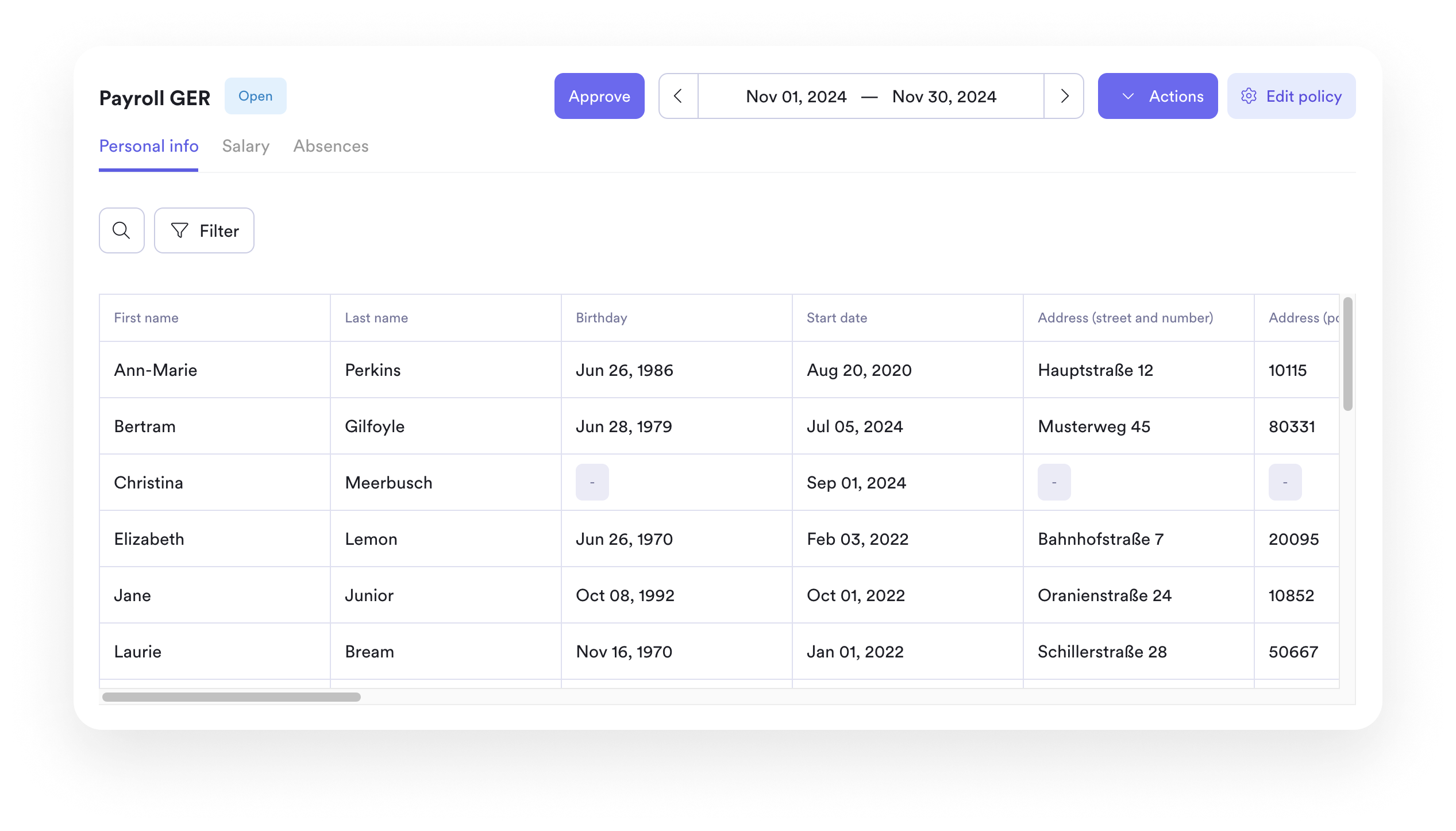
With payroll automation, HR teams can leave behind the manual, tedious payroll tasks of the past.
These systems handle data entry, tax filing, and payslip generation efficiently, enabling prompt and accurate payroll management every cycle.
Choosing a solution that integrates seamlessly with other HR functions can transform payroll from an administrative burden into a process both employees and HR love.
And if you’re wondering how to choose an HRIS software provider with all the capabilities your organization needs? That’s where we can help!
Leapsome’s new HRIS offers flexible payroll automation designed to grow with your organization. Combined with advanced employee engagement and people enablement tools, it can centralize all stages of the employee lifecycle, helping you build a high-performing workplace.
“Employees can now find everything in one place — their data, absences, goals, and reviews. I don’t have to explain which tool to use for what. It’s all in Leapsome.” — Merilyn L, Senior People Operations Specialist | Bob W
⭐ Try our game-changing HR platform
Discover how Leapsome’s comprehensive set of HR and people enablement tools facilitate thriving operations and a great work culture.
👉 Request a demo
Disclaimer: This article is for informational purposes only and doesn’t offer legal, tax, or financial advice. While we’ve done our best to ensure accuracy and completeness, we can’t guarantee everything is up-to-date or error-free. For tailored advice, we recommend consulting a qualified lawyer or tax advisor.
FAQ
What are payroll systems?
Payroll systems are the tools and processes companies use to pay employees. They usually encompass wage calculations, pay stub generation, and payment processing, as well as record-keeping for past payroll cycles.
A payroll system can be manual or automated. In a manual setup, HR or finance teams may rely on spreadsheets and repeated data entry to pay employees accurately and on-time. In an automated payroll system, software pulls information from connected tools to handle those recurring payroll tasks.
What are the best payroll processing services?
The best payroll processing service depends on how complex your payroll needs are and what your HR team can handle. A small company may need a simple program that calculates pay, files taxes, and supports direct deposit, while a mid-sized company in the middle of a growth spurt may need stronger compliance support from a tool that integrates with its HR system.
Common payroll processing options include ADP, Gusto, and Paychex, among dozens of other software choices. There are also options like outsourcing payroll services to third-party organizations, but they tend to be more expensive and can completely remove payroll from your ecosystem.
Before choosing a payroll software provider, look at how the tool handles employee data, approvals, reporting, and support. The right service should make payroll easier to run without giving HR more manual checklists every cycle.
Leapsome Team